
Latest: OMG new page to make you iaptus superhuman, for more information read about our new task feature here.

iaptus helpsite / Treatment / Supervision / Viewing a Patient’s Supervision Notes

Viewing a Patient’s Supervision Notes

Table of contents

Any notes that have been recorded against a patient during a Supervision session will be displayed in the Clinical Contacts tab under the ‘Supervision Summary/Notes’ section.
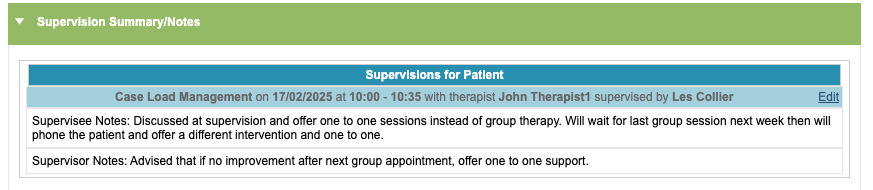
For the notes to appear here, the user must save the session as complete, not a draft.

Clicking ‘Edit’ here will allow you to update the notes for the Supervision session.

Related posts
My Therapists

The My Therapists area allows supervisors to view a quick summary of their supervisees. Therapists can be set as supervisors and have supervisees assigned to

Creating a Supervision Session

Click Create a new Supervision to start a new session. Only supervisee therapists will see this option. A new supervision form will appear for you

Editing a Supervision Session

The supervisee and supervisor can both make changes to the supervision session before it takes place. Within the Planned Supervisions table, click Edit to start

Table of contents