
Latest: OMG new page to make you iaptus superhuman, for more information read about our new task feature here.

iaptus helpsite / Reports / Hypercube / Therapist Time Analysis

Therapist Time Analysis

Table of contents

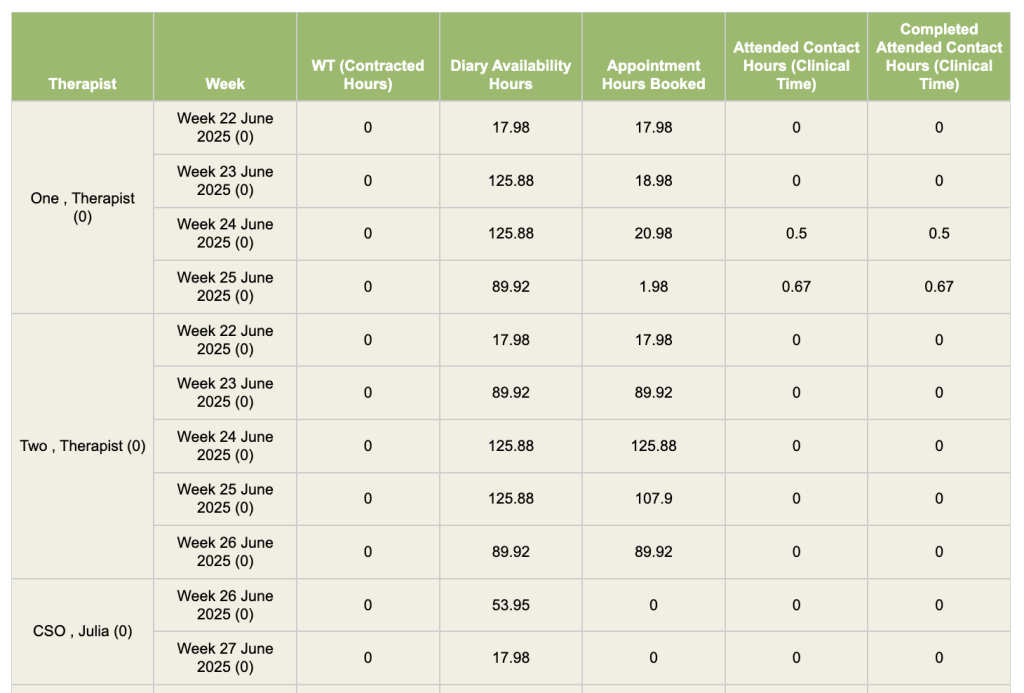
This report shows how many hours therapists are using from the “contracted hours” field from the “users” superuser menu field.

Contracted Hours:
This needs to be set for every user in the user’s superuser menu.

Diary Availability Hours:
Hours made available for the week, from diary.

Appointment Hours Booked:
Diary appointments booked. This figure is calculated using the appointment length box found when booking appointments.

Attended Contact Hours (Clinical Time):
Clinical time for attended contacts (incomplete and complete).

Completed Attended Contact Hours:
Clinical time for attended contacts (completed contacts only).

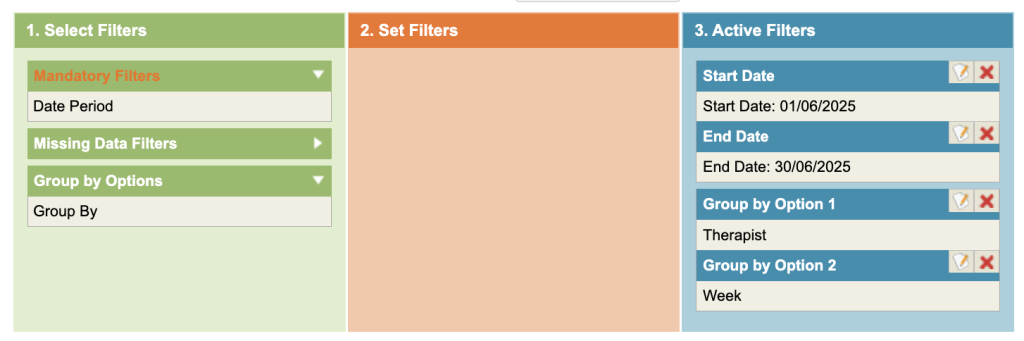
Under the Mandatory Filters, select the date range. Add the Group by Option 1 = Therapist Option 2 = Week.
Related posts
Introduction to Hypercube

This section will provide users with an overview of Hypercube, including how to use the filters. It will also cover common reporting themes. It is

Referral Count

This report will count the number of referrals which match the selected criteria. It will not include patients who have been registered but where the

Patient Count

This report counts the number of registered patients. Registered patients with no referral areincluded in this report. This means you may sometimes get a higher

Table of contents