
If your service uses Prism to refer to Online providers, Bulk Actions offers the option to refer a group of patients to an Online Provider in one go.
Click the action type ‘Refer to Online Provider’, then select from the dropdown list which provider you wish to referral all these patients too.
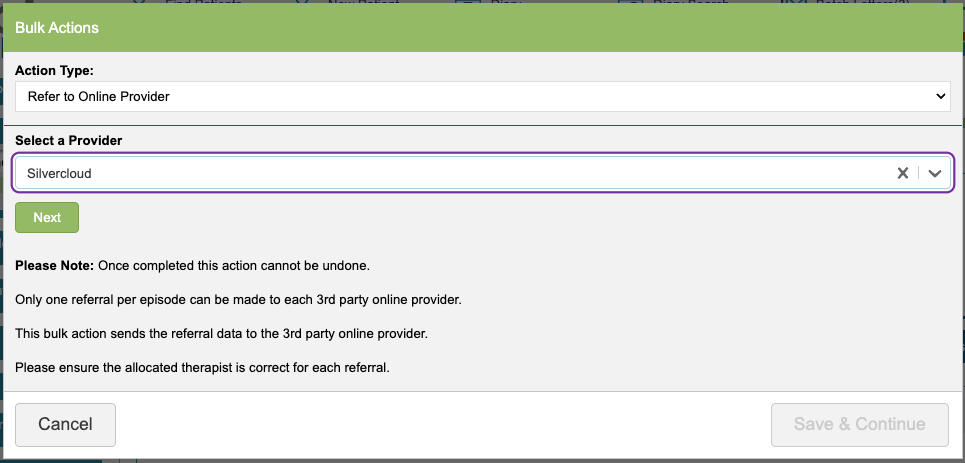
Depending on the provider you select, you may be prompted to complete additional fields such as selecting a course or adding notes. These additional fields will appear according to individual provider requirements just as they do when making an individual patient referral to the provider.
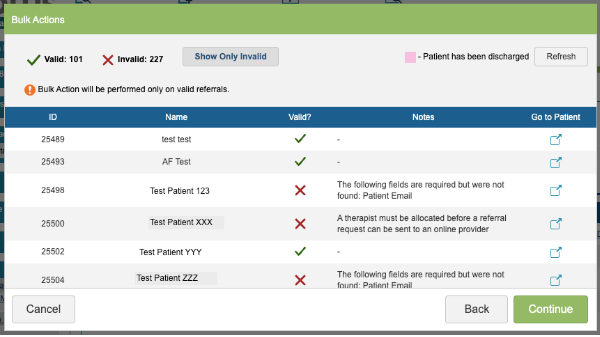
The system will review all of the patients in your search and flag any missing information that would prevent a referral from sending. The ‘Go to Patient’ column allows you to open the record in a separate tab and update the missing data. When you return to this tab and click refresh, the records will be marked as ‘Valid’ if all the errors have been corrected. You can then continue to refer all ‘Valid’ patients to the provider.
Click ‘Continue’ to complete the action. When you click ‘review and continue the Bulk Action will be performed. The system can take a while to process and review all of the patients within your saved search, please be patient whilst this process is completed.